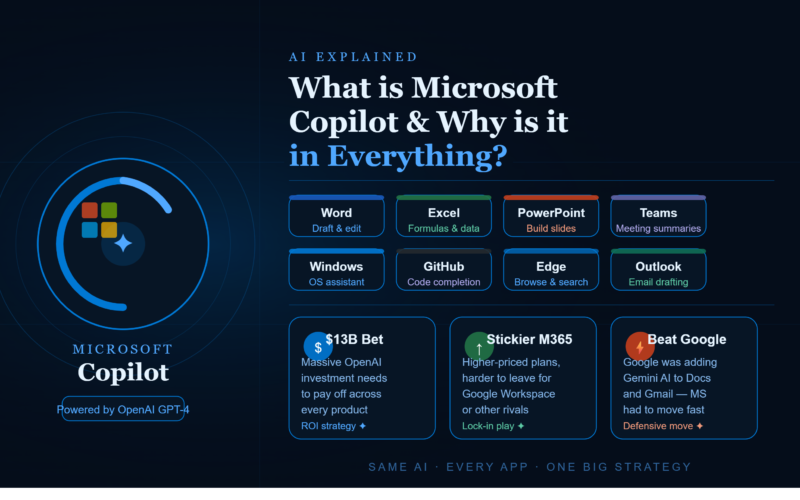
If you have been to windows, Word, Excel, and or teams recently you may have started to notice the AI known as Copilot appearing. In today’s article, I will be giving an overview of Microsoft’s Copilot to answer the question of what exactly it is, how it works, and if it really adds value for users.
What is Microsoft Copilot?
Basically, this technology combines Microsoft’s widely adopted productivity tools such as Word, Excel, PowerPoint, and other programs into a seamless AI integration, and to put it quite frankly, it’s amazing!
What Microsoft basically did was take ChatGPt’s underlying AI technology and embed it into its programs making it a highly beneficial resource to anyone using those applications. AI assisted work flowsCopilot was created so that you would have an artificial intelligence, or an intelligent helper, which integrates directly into your workspace. Thus you won’t have to switch applications as readily while trying to do work, let’s look at each. Work on your document with AI in word Copilot integrates right into your new or existing Microsoft Word documents.
All you have to do is type out the general details of what you’d like, and your new document can be drafted in seconds, and on the contrary if you’re working on a new file then Copilot can help summarize it for you.
It has the ability to rewrite your documents or just make it much easier to comprehend for example. Analysis and assistance from Excel with AI Copilot allows excel to analyze large amounts of data, generate reports and graphs, as well as even give explanations to formulas. Just describe what you want it to do, and Copilot generates the spreadsheet data, charts and formulas.
AI meetings and summaries Copilot can join any teams’ meeting, document it, transcribe all meetings, and then provide meeting participants with detailed summaries that include any action items and key decisions. What this offers people who struggle to keeping up during meetings, it truly offers them the ability to look over the details after the meeting. Copilot prices and availabilityCopilot in Windows will be free however for usage in Word, Excel, and Teams you will have to opt-in for an additional paid service when paying for your regular Micosfot 365 plans.
This paid service works on individuals by providing assistance to those using applications at Copilot.microsoft.com.
Microsoft’s goal Microsoft is confident that this is how we will all be using AI, therefore trying to makeCopilot worth considering.
Microsoft Copilot is their branding for the AI assistance that runs on large language models (these are mostly powered by OpenAI, because Microsoft put more money into this partnership). So, that’s why it’s basically in everything: What it actually is The thing you’re probably most interacting with is Copilot for the Office suite of products. It really is a wrapper around large language models similar to those you’d find in GPT-4, tailored for certainMicrosoft-y workflows.
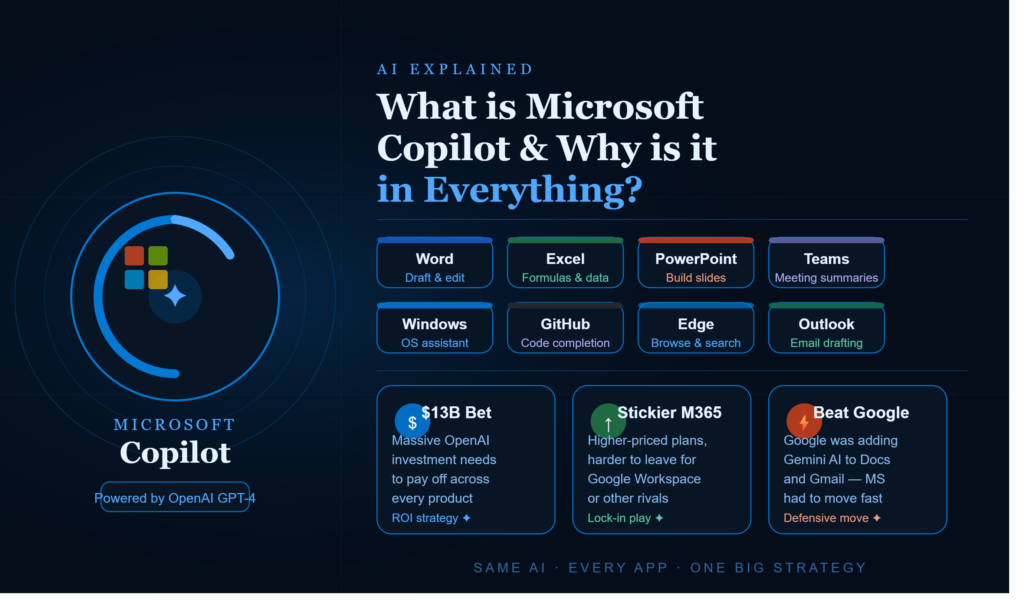
Word will write draft docs for you, Excel can write your formulas and do the analysis, Copilot for Teams can take meeting notes, GitHub Copilot is your code completer, Windows Copilot can do a surprising amount answering your PC questions, but it’s all the same underlying technology.
The difference lies in the particular surface layer for each app and the permissions that the Copilot for that app can access.
Why is it in everything?
The short answer is Microsoft bet very big – there were rumours of over $13 billion in investment in OpenAI alone – and needs that money to return value, and it wants to do so via its products. The math is pretty simple: If the services people already pay Microsoft for get an AI component, they’re perceived as more valuable, justifying higher prices, and potentially dissuading people from moving to competitors.
This also serves as a strategic defence against Microsoft’s primary rival, Google, which has been incrementally adding AI capabilities into Docs, Sheets, and Gmail.
If Microsoft had stood still, customers could have questioned the value of a Microsoft 365 subscription at all. GitHub is interesting Here, a note to make is that the initial product to carry the Copilot moniker was GitHub Copilot back in 2021, when it offered an extremely impressive (for the time) code completion assistant. That early success likely paved the way for the Copilot brand’s ubiquity in other products, some of which might seem like slightly shallower applications of the technology.
The honest verdict The truth is that some implementations of Microsoft Copilot are genuinely revolutionary ( GitHub, for example, is outstanding), others are a good first attempt that just feel like Microsoft slapping an AI button on an existing piece of software to try and sell you a pricier subscription. The consistency that you will observe between different Copilot versions isn’t technology-driven, but rather a business initiative, with the goal of making its ecosystem stickier and more lucrative.
Leave a Reply